Hakikisha: Check Who You’re Paying Before Sending Money
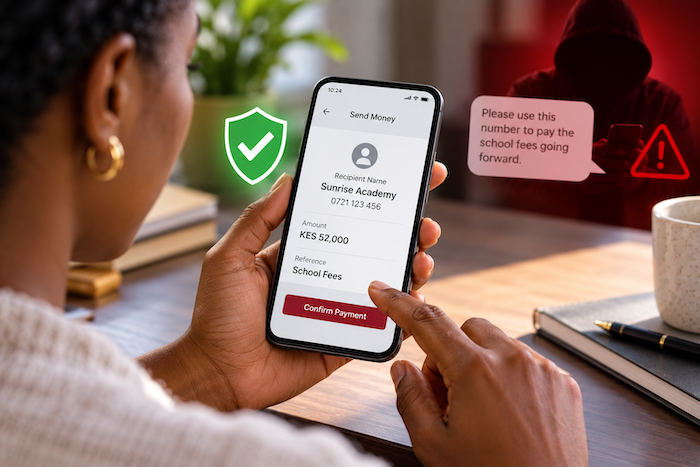
Mary was about to pay her daughter’s school fees when a text message came through.
“Please use this number to pay the school fees going forward.”
The message appeared routine. It carried the school’s name and came at a time when Mary was preparing to make the payment. She entered the number into her Equity account, keyed in the amount and was ready to confirm.
But before sending the money, she checked the recipient’s name displayed on the screen.
It was not the school.
Mary had almost sent her daughter’s school fees to a fraudster.
The same situation can arise with other everyday payments. You could receive a message telling you to send your rent to a new number, or someone posing as a supplier could send new payment details for an outstanding invoice.
If you act quickly without checking who will receive the money, your payment could end up with an unintended recipient.
Don’t Let a Familiar Payment Become Automatic
When you receive new payment instructions, take a moment before acting on them.
Whether you are paying school fees, rent, a supplier or another regular bill, check the recipient before completing the transaction.
The message may look convincing. The amount may be correct. The payment details may even appear to have come from someone you know.
But the most important question is: Who will actually receive the money?
Make the Final Check Count
When making a payment through Equity, do not treat the confirmation stage as a formality.
Before you confirm the transaction, check the recipient’s name displayed on your screen. Compare it with the person, business or institution you intended to pay.
If the details do not match, stop the transaction.
If someone has sent you new payment instructions, independently confirm the change with the school, landlord, supplier or other intended recipient before proceeding.
See Who You Are Paying
This is where Hakikisha can help.
When making a payment, Equity Bank’s Hakikisha feature allows you to see the recipient’s name before completing the transaction. This gives you an opportunity to confirm that the money is going to the intended person, business or institution.
For Mary, that check could reveal that the payment number in the message did not belong to her daughter’s school.
The same principle applies when paying rent, settling a supplier invoice or sending money to an individual. Even when payment details have been sent to you by text, take a moment to check who is receiving the money.
You can also make this check when paying across mobile networks. The recipient’s network should not be a reason to skip the verification step.
Four Checks to Make Before Sending Money
1. Check the recipient’s name
See who is receiving the money before you confirm the transaction.
2. Match it with the intended recipient
Make sure the name corresponds with the school, landlord, supplier or person you intend to pay.
3. Verify changed payment details
Confirm any new instructions directly with the intended recipient before making the payment.
4. Stop when there is a mismatch
Do not complete the transaction if the displayed recipient is not who you expected.
Digital payments are designed to be fast. Fraudsters know this and may rely on you acting without taking a moment to check.
Before you send money, check who you are sending it to.
For more tips on secure banking, visit Equity Bank’s Secure Banking Tips.
#KaaChonjo
Stay Connected with Nairobi Lifestyle
Follow us on X, Instagram and Facebook for the latest stories, trends and updates from Nairobi and beyond.
X: https://x.com/NBOLifestyle
Instagram: https://www.instagram.com/nairobilifestyles/
Facebook: https://web.facebook.com/nbolifestyle